Mission Briefing
By the end of this mission, you will be able to:
Explain how a PIR sensor detects motion
Describe what “PIR” stands for and what it actually senses
Wire a PIR sensor to the ESP32 correctly
Read and display motion detection in the Serial Monitor
Let's Get Started
Think about a motion-activated light that flicks on the second you walk into a room, or a security camera that only starts recording when someone walks by. In this lesson, you'll meet the sensor behind both of those: the PIR motion sensor.
Robo says: “This sensor doesn't measure distance, color, or sound — it senses something much more specific: the heat given off by moving bodies. Let's wire one up.”
What Is A PIR Sensor?
PIR stands for Passive Infrared. It doesn't measure distance or exact position — it detects changes in infrared (heat) radiation, like the warmth from a moving body passing through its field of view. It's called “passive” because it doesn't send out any signal of its own (unlike a distance sensor); it simply watches for changes in the infrared radiation it receives.
Digital Input (Reading The PIR)
The PIR sensor's OUT pin behaves just like a button: it outputs HIGH when it detects motion, and LOW when it doesn't. That means you can read it with the exact same digitalRead() function you've used before.
Wiring
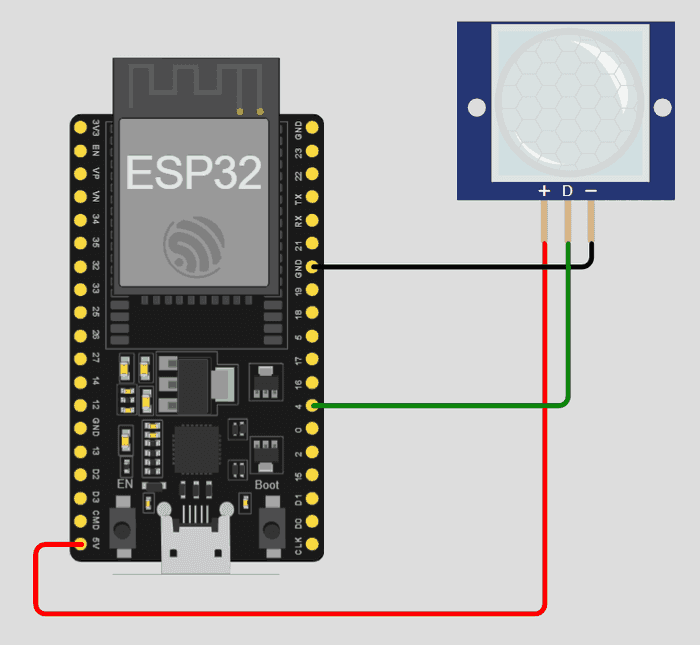
This lesson's circuit connects the PIR sensor like this:
VCC → 5V (or 3.3V depending on module)
GND → GND
OUT → GPIO 4
Equipment
- ESP32
- PIR motion sensor (HC-SR501)
- Jumper wires
Activity
Print “Motion Detected” in the Serial Monitor.
Code
int pirPin = 4;
void setup() {
pinMode(pirPin, INPUT);
Serial.begin(115200);
}
void loop() {
int motion = digitalRead(pirPin);
if (motion == HIGH) {
Serial.println("Motion Detected!");
} else {
Serial.println("No Motion");
}
delay(500);
}
Did You Know?
- • PIR sensors need about 30-60 seconds of warm-up time after power-on before their readings stabilize — testing too early can give false readings.
- • Most PIR sensor modules have two small adjustable knobs on the back for tuning sensitivity and delay time.
🔧 Try It Yourself
Try a few different movements in front of the sensor, then write down what the Serial Monitor printed:
Example: Staying still — printed “No Motion” the whole time.
• Staying completely still
• Waving your hand
• Walking across the room
int pirPin = 4;
void setup() {
pinMode(pirPin, INPUT);
Serial.begin(115200);
}
void loop() {
int motion = digitalRead(pirPin);
if (motion == HIGH) {
Serial.println("Motion Detected!");
} else {
Serial.println("No Motion");
}
delay(500);
}
Think About It
🤔 Discuss With a Partner or Write Your Answer
Since a PIR sensor detects heat changes rather than exact position, what do you think would happen if a warm object (like a heater) turned on nearby, without anyone moving?
Quick Recap: Fill In The Blanks
1. PIR stands for ________ ________.
2. A PIR sensor detects changes in ________ radiation, like body heat.
3. The word “passive” means the sensor doesn't ________ out any signal of its own.
4. A PIR sensor needs about ________ seconds to warm up before giving reliable readings.
Match It!
Draw a line (or write the matching letter in the blank) to connect each word to its meaning.
Check Your Understanding
I can explain how a PIR sensor detects motion
I can describe what “PIR” stands for and what it actually senses
I can wire a PIR sensor to the ESP32 correctly
I can read and display motion detection in the Serial Monitor
Quiz Time!
Question 1: What does PIR stand for?
🔍 Reveal answer (drag-select the blank space): B
Question 2: What does a PIR sensor actually detect?
🔍 Reveal answer (drag-select the blank space): B
Question 3: How long should you wait after powering on a PIR sensor before trusting its readings?
🔍 Reveal answer (drag-select the blank space): B
Challenge Zone
🏆 Level Up
Can you make your code count and print how many times motion was detected?
Robot Journal
Name one real device in your home or school that likely uses a PIR sensor, and explain how you think it works.
Key Vocabulary
Term
Definition
PIR Sensor
A sensor that detects motion by sensing changes in infrared (heat) radiation.
Passive
Not sending out any signal of its own; only observing.
Infrared
A type of radiation related to heat, invisible to the human eye.
Warm-up Time
The time a sensor needs after power-on before its readings are reliable.
Lesson Wrap-up
🤖 Robo Says
Your circuit can now sense movement! Next up: Lesson 2 — you'll connect that motion detection straight to a light.