Mission Briefing
By the end of this mission, you will be able to:
Explain what an OLED display is and how it communicates over I2C
Describe the role of the Adafruit_GFX and Adafruit_SSD1306 libraries
Wire an SSD1306 OLED display to the ESP32 correctly
Display text on the screen using code
Let's Get Started
Every gadget with a screen — smartwatches, game consoles, thermostats — needs a display to show information. In this lesson, you'll add your own screen to your ESP32 projects.
Robo says: “Up until now, your projects have talked to you through the Serial Monitor. Today, they get their own screen.”
What Is An OLED Display?
The SSD1306 is a small 0.96" screen made of OLED (Organic Light Emitting Diode) pixels that light up individually — meaning there's no backlight, and “off” pixels are truly black, giving deep contrast. It's a 128×64 pixel monochrome (single-color) display.
I2C Communication
Just like the VL53L0X distance sensor, the OLED communicates over I2C, using the same SDA/SCL wiring pattern. This means multiple I2C devices (like this display and a distance sensor) can often share the same two wires.
Required Libraries
Adafruit_GFX provides the drawing tools (text, shapes, lines) while Adafruit_SSD1306 handles talking to this specific screen over I2C. Together they let you control every pixel with simple function calls instead of raw hardware commands.
Wiring
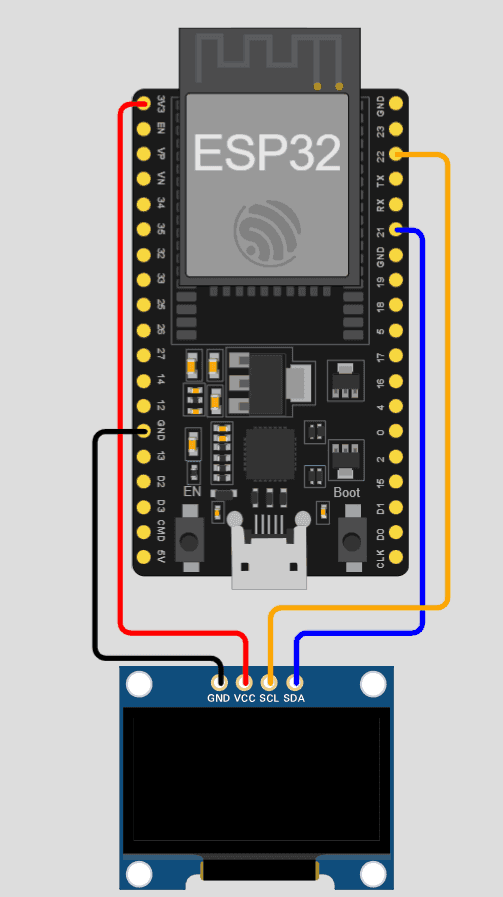
This lesson's circuit connects the OLED display like this:
VCC → 3.3V
GND → GND
SDA → GPIO 21
SCL → GPIO 22
Equipment
- ESP32
- SSD1306 OLED display (0.96", I2C)
- Jumper wires
Activity
Display “Hello World” on the screen.
Code
#include <Wire.h>
#include <Adafruit_GFX.h>
#include <Adafruit_SSD1306.h>
#define SCREEN_WIDTH 128
#define SCREEN_HEIGHT 64
Adafruit_SSD1306 display(SCREEN_WIDTH, SCREEN_HEIGHT, &Wire, -1);
void setup() {
Wire.begin(21, 22);
if (!display.begin(SSD1306_SWITCHCAPVCC, 0x3C)) {
while (1);
}
display.clearDisplay();
display.setTextSize(2);
display.setTextColor(WHITE);
display.setCursor(0, 10);
display.println("Hello!");
display.display();
}
void loop() {}
Did You Know?
- • OLED stands for Organic Light Emitting Diode — each pixel produces its own light, so OLED screens have true blacks and don't need a backlight like LCD screens.
- • The address 0x3C in this lesson's code is the OLED's I2C address, a unique ID that lets the ESP32 find it among any other I2C devices connected.
🔧 Try It Yourself
Try changing the code, then write down what you changed:
Example: Changed “Hello!” to my own name, and it appeared on the screen instead.
• Change the displayed text to your own message
• Change setTextSize(2) to a different number
#include <Wire.h>
#include <Adafruit_GFX.h>
#include <Adafruit_SSD1306.h>
#define SCREEN_WIDTH 128
#define SCREEN_HEIGHT 64
Adafruit_SSD1306 display(SCREEN_WIDTH, SCREEN_HEIGHT, &Wire, -1);
void setup() {
Wire.begin(21, 22);
if (!display.begin(SSD1306_SWITCHCAPVCC, 0x3C)) {
while (1);
}
display.clearDisplay();
display.setTextSize(2);
display.setTextColor(WHITE);
display.setCursor(0, 10);
display.println("Hello!");
display.display();
}
void loop() {}
Think About It
🤔 Discuss With a Partner or Write Your Answer
Why do you think display.display() is a separate command from all the display.print()/setCursor() lines above it? What might happen if you left it out?
Quick Recap: Fill In The Blanks
1. OLED stands for ________ Light Emitting Diode.
2. The OLED display communicates with the ESP32 using ________ communication, the same as some sensors you've used before.
3. The ________ library provides drawing tools like text and shapes, while Adafruit_SSD1306 talks to this specific screen.
4. The command ________() must be called to actually push your changes onto the physical screen.
Match It!
Draw a line (or write the matching letter in the blank) to connect each word to its meaning.
Check Your Understanding
I can explain what an OLED display is and how it communicates over I2C
I can describe the role of the Adafruit_GFX and Adafruit_SSD1306 libraries
I can wire an SSD1306 OLED display to the ESP32 correctly
I can display text on the screen using code
Quiz Time!
Question 1: What does OLED stand for?
🔍 Reveal answer (drag-select the blank space): B
Question 2: What communication protocol does the SSD1306 use?
🔍 Reveal answer (drag-select the blank space): B
Question 3: What does display.display() do?
🔍 Reveal answer (drag-select the blank space): B
Challenge Zone
🏆 Level Up
Can you make the screen display two lines of text, each a different size?
Robot Journal
Name one real device with a small screen like this one, and describe what kind of information it shows.
Lesson Wrap-up
🤖 Robo Says
Your project just got its first screen! Next up: Lesson 2 — you'll turn it into a live sensor dashboard.