Mission Briefing
By the end of this mission, you will be able to:
Explain how a joystick module measures two directions at once
Describe what the joystick's center (rest) value represents
Wire a joystick module to the ESP32 correctly
Read and display X and Y values in the Serial Monitor
Let's Get Started
Game controllers, drone remotes, and RC car transmitters all use one component to control two directions at once: the joystick. In this lesson, you'll wire one up and read exactly what it's telling your ESP32.
Robo says: “A joystick is really two sensors hiding inside one stick. Let's wire it up and see both directions at once.”
What Is A Joystick Module?
A joystick module is really just two potentiometers built into one stick — one measures how far you've pushed left or right (the X axis), and the other measures how far you've pushed up or down (the Y axis). It also usually has a built-in push button (SW), triggered by pressing straight down on the stick.
The Center Value
When you're not touching the joystick, it doesn't rest at 0 — it rests near the middle of its range, around 2048 on the ESP32's 0-4095 scale. This “center value” is important because it tells your code the stick isn't being pushed in any direction.
Wiring
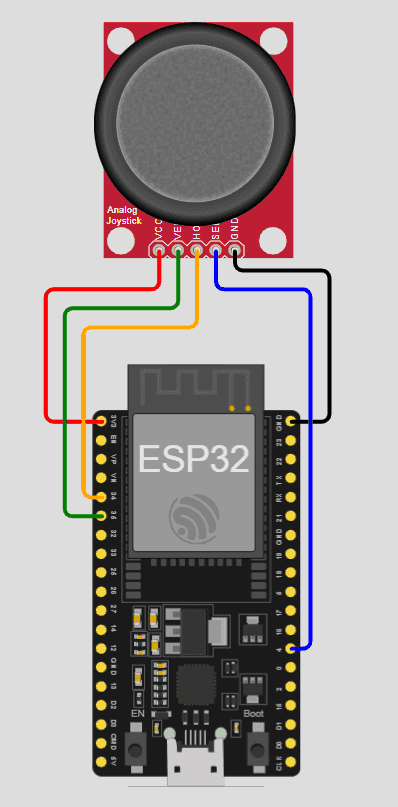
This lesson's circuit connects the joystick like this:
VCC → 3.3V
GND → GND
VRX → GPIO 34
VRY → GPIO 35
SW → GPIO 4 (button)
Equipment
- ESP32
- Joystick module (XY + button)
- Jumper wires
Activity
Read X and Y values in the Serial Monitor.
Code
int xPin = 34;
int yPin = 35;
void setup() {
Serial.begin(115200);
}
void loop() {
int xValue = analogRead(xPin);
int yValue = analogRead(yPin);
Serial.print("X: ");
Serial.print(xValue);
Serial.print(" Y: ");
Serial.println(yValue);
delay(200);
}
Did You Know?
- • Most joystick modules use the same VRX/VRY/SW pin naming, so what you learn here transfers directly to other joystick hardware.
- • A small amount of jitter around the center value is completely normal — this is why many joystick projects use a “dead zone” to ignore tiny, unintentional movements.
🔧 Try It Yourself
Leave the joystick untouched, then push it in each direction, recording the readings each time:
Example: Resting — X: 2043 Y: 2051
• Resting (untouched)
• Pushed fully left
• Pushed fully up
int xPin = 34;
int yPin = 35;
void setup() {
Serial.begin(115200);
}
void loop() {
int xValue = analogRead(xPin);
int yValue = analogRead(yPin);
Serial.print("X: ");
Serial.print(xValue);
Serial.print(" Y: ");
Serial.println(yValue);
delay(200);
}
Think About It
🤔 Discuss With a Partner or Write Your Answer
Why do you think the joystick's resting value is around 2048 instead of 0? What would change about your code if the resting value were 0 instead?
Quick Recap: Fill In The Blanks
1. A joystick module is really ________ potentiometers built into one stick.
2. The X axis measures ________/right movement, while the Y axis measures up/down movement.
3. When left untouched, a joystick rests near its ________ value, not 0.
4. The joystick's built-in button is usually connected to a pin labeled ________.
Match It!
Draw a line (or write the matching letter in the blank) to connect each word to its meaning.
Check Your Understanding
I can explain how a joystick module measures two directions at once
I can describe what the joystick's center (rest) value represents
I can wire a joystick module to the ESP32 correctly
I can read and display X and Y values in the Serial Monitor
Quiz Time!
Question 1: How many potentiometers are inside a typical joystick module?
🔍 Reveal answer (drag-select the blank space): B
Question 2: What does the joystick's Y axis measure?
🔍 Reveal answer (drag-select the blank space): B
Question 3: Approximately what value does the joystick rest at on the ESP32's 0-4095 scale?
🔍 Reveal answer (drag-select the blank space): B
Challenge Zone
🏆 Level Up
Can you make your code print “Centered”, “Left”, “Right”, “Up”, or “Down” based on the X and Y readings, instead of just the raw numbers?
Robot Journal
Name one real device that uses a joystick, and explain what it's used to control.
Lesson Wrap-up
🤖 Robo Says
Your joystick is reading both directions at once! Next up: Lesson 2 — you'll use those readings to light up LEDs based on direction.